
How to Record Purchases for Non-Coffee Items
Recording purchases for non-coffee products (like syrups, merchandise, supplies, and other retail items) keeps your inventory and costs accurate.
Overview:
Why Record Purchases
When you buy non-coffee inventory at different prices over time, recording each purchase ensures:
- Accurate inventory costs — The system tracks your weighted average cost per item
- Reliable profitability reports — Your reports reflect the true cost of goods sold
- No cost errors — Costs stay accurate even when supplier prices change
Example: You have syrups at $9.00 each. Your next order costs $9.50 per unit. Recording both purchases ensures your inventory cost reflects the weighted average of both prices.
How to Record a Purchase
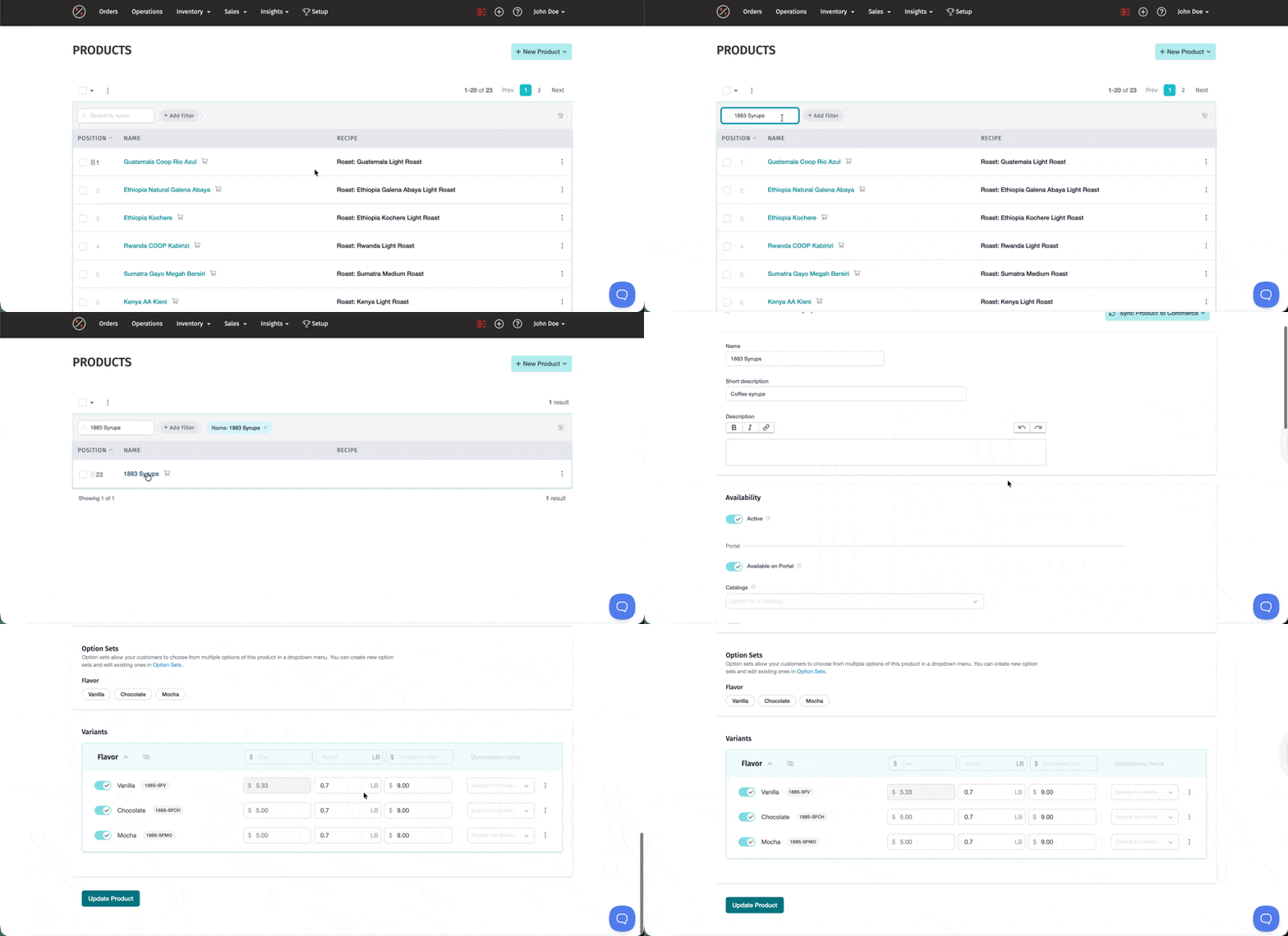
Step 1: Navigate to the Product
- Go to Inventory > Products
- Find your product
- Click the product name to open it
Step 2: Access the Purchase Option
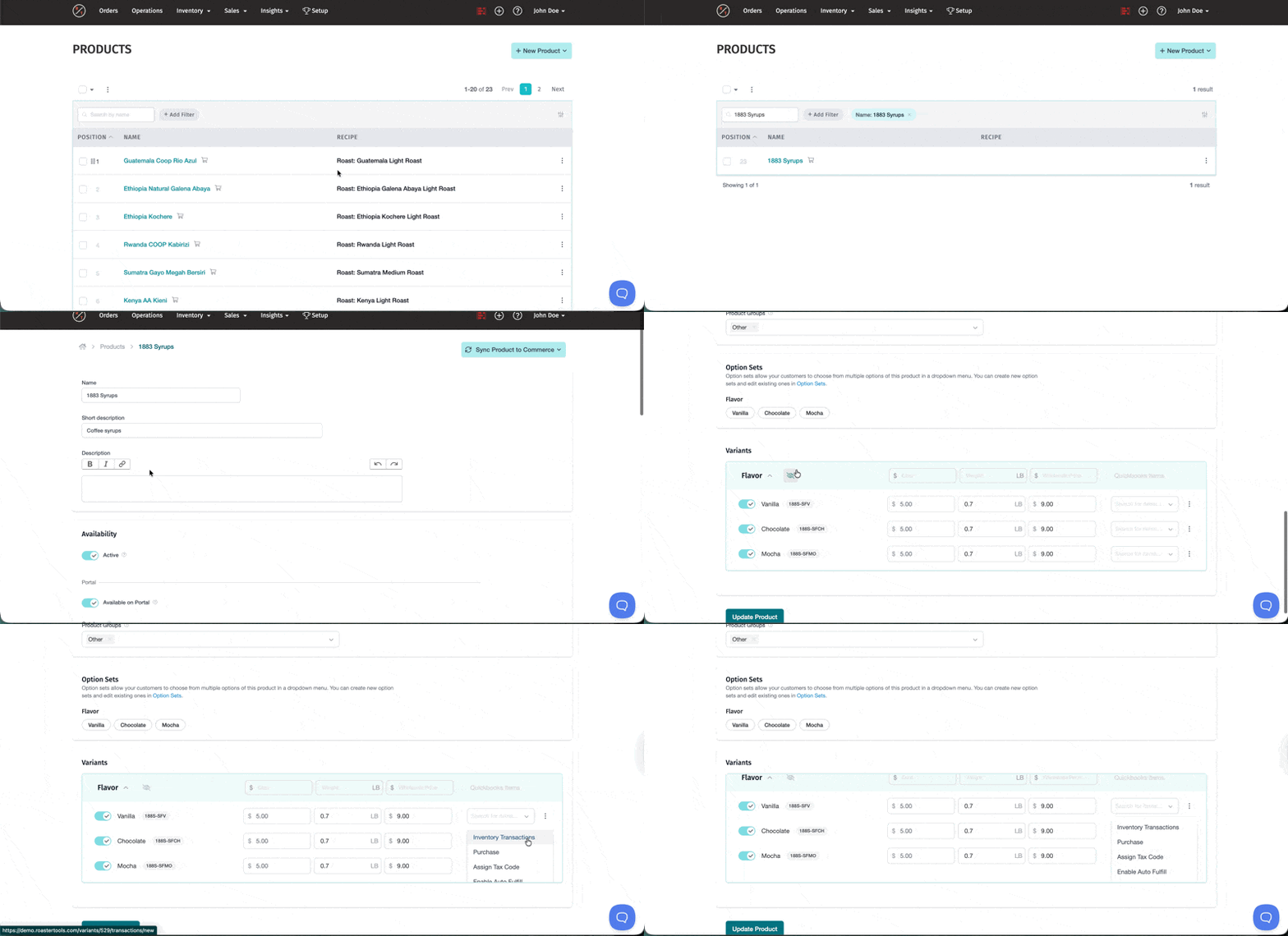
On the product page, you'll see all variants listed (different flavors, sizes, etc.).
- Find the variant you purchased
- Click the dropdown arrow on the right side of that variant row
- Select Purchase
Step 3: Enter Purchase Details
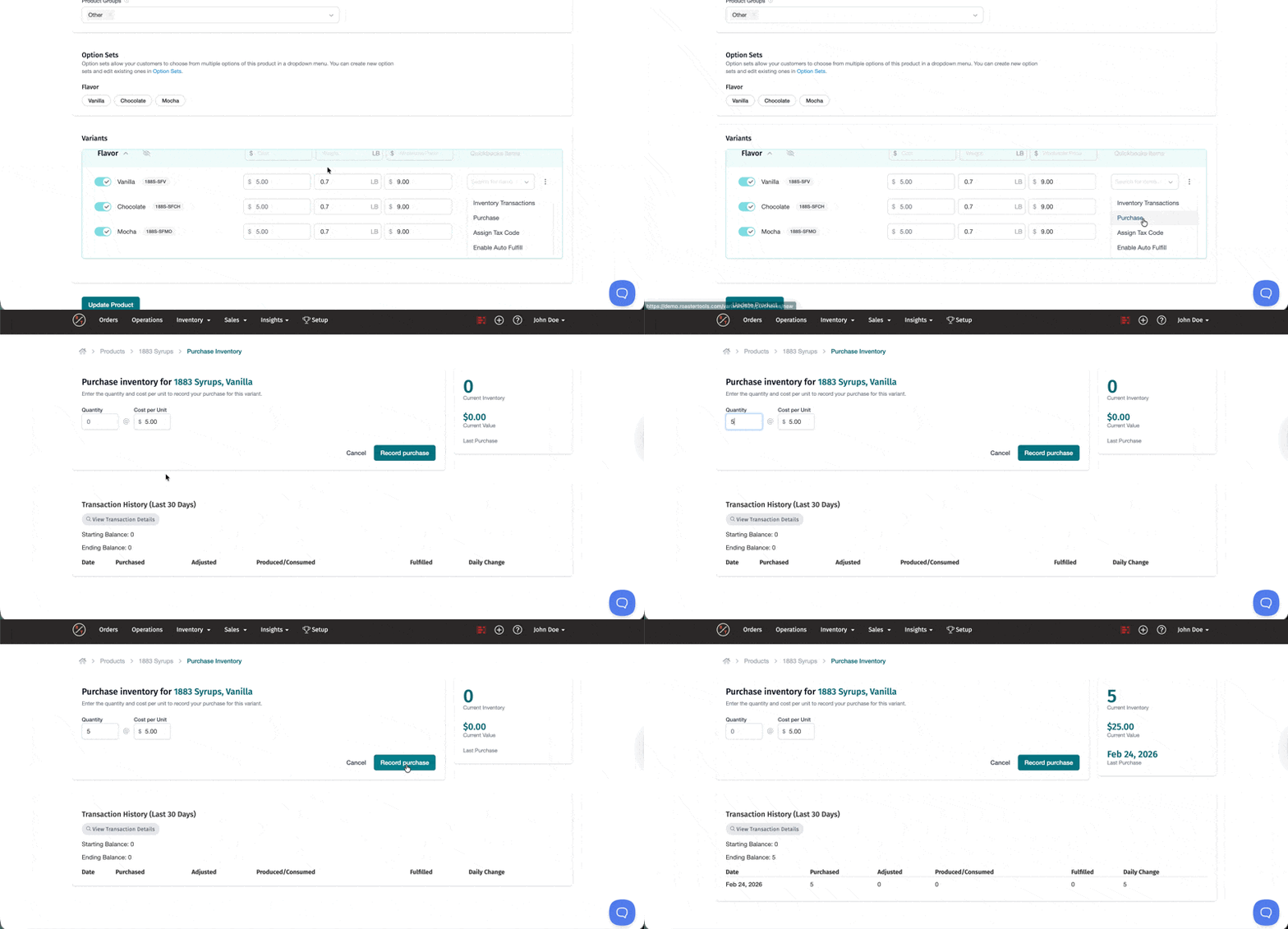
In the Purchase dialog:
- Enter the Quantity you purchased
- Enter the Cost per unit for this purchase
- Click Record Purchase
The system automatically updates your inventory quantity and recalculates the weighted average cost for that variant.
Understanding Weighted Average Cost
RoasterTools uses weighted average cost to track non-coffee inventory. When you purchase items at different prices, the system calculates an average based on both quantity and price.
How It Works
Example:
- You have 10 units @ $9.00/unit = $90.00 total value
- You purchase 5 more units @ $9.50/unit = $47.50
- New average: $9.17/unit for all 15 units
- Calculation: ($90.00 + $47.50) ÷ 15 units = $9.17/unit
This weighted average is used when calculating your COGS.
Best Practices
Enable Positive Inventory Protection
Newer RoasterTools accounts already require there to be positive inventory for an item in order to fulfill it. However older accounts may not have this setting enable and therefore the inventory can go negative.
Important: To maintain accurate costs, you need to have positive inventory setting enabled. Contact support@roastertools.com to enable "Positive Variant Inventory Required" for your account.
With this setting enabled:
- You can't fulfill orders without enough inventory
- The system prevents inventory from going negative
- Costs remain accurate as inventory moves through your system
If you try to fulfill without enough inventory, you'll see a "not enough inventory" message. You'll need to either record a purchase (recommended) or adjust inventory.
Tip: Before planning production check Operations > Count > Tab "Other" to review non-coffee inventory levels for items on today's orders. This helps you identify what needs to be purchased or adjusted before fulfillment.
Common Scenarios
Q: I recorded a purchase and now my costs changed. Is this normal?
A: Yes, this is expected if your old cost is different than the new cost. The system will calculation your weighted average costs which will update immediately when you record a purchase. Any orders fulfilled after the purchase will use the new average cost.
Q: Is purchasing the only way to add inventory to a non coffee product?
A: No, you can also use the inventory adjustment feature. Recording purchases is the best practice to update costs. If you adjust the inventory the cost remains the same. See How to Adjust and Count Inventory for details.
Q: Where can I see purchase history and current costs?
A: Go to Inventory > Products, open the product, click the dropdown arrow next to the variant, and select Purchase. You'll see current weighted average cost, purchase history, current inventory value, and transaction history.
Q: Which reports include cost data?
A: Cost data appears in Product Sales Report (Total Value Sold), Production Summary > Other Products Report (Total Value), Production Summary > Customer Report (Total Value and Profit Margin), and Inventory Report (Net Value Change and Total Value).
Learn More: For details on green coffee purchasing, see Green Coffee: Creating, Updating Inventory and Purchasing.
Learn More: For creating non-coffee products, see How to Create Other Products (non-coffee).
Learn More: For inventory best practices, see Maintaining Accurate Inventory Costs in RoasterTools.