
Accounting: How to Import and Review Customers
Use customer records from your accounting platform to create wholesale customers in RoasterTools. Each imported customer is mapped to its accounting record at the same time. After importing, review the customer and contact data before relying on it for ordering, delivery, or tax calculation.
Importing is optional. If a customer already exists in both systems, map the two existing records instead of importing another customer.
Using a QuickBooks Online connection created before 2026? Use a comma-separated values (CSV) file and follow Add customers with the CSV importer. This article applies to QuickBooks Online connections created after January 1, 2026, and all Xero and QuickBooks Desktop connections.
In this guide
1. Open customer mappings
- Open Integrations and select your accounting connection.
- Open Mappings, then Customers.
- Under View as, choose your accounting platform.
This view lists the customers available from your accounting platform and shows which ones are already mapped to RoasterTools. Your platform name may differ from the QuickBooks Online example shown below.
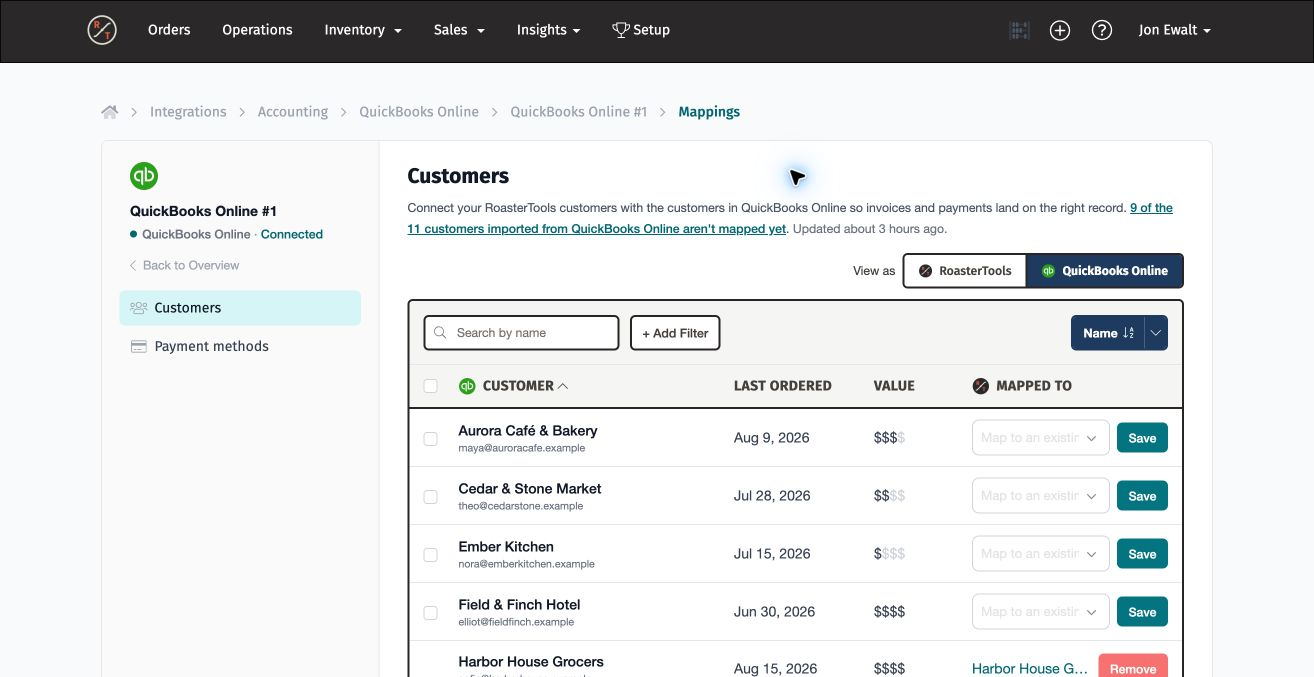
Choose the action that matches the customer. Import a customer when it does not exist in RoasterTools. If the customer already exists in RoasterTools, map the existing records instead.
2. Import or map one customer
Work one customer at a time when you need a specific customer now or want to review each record before importing it.
- Find the customer in the accounting-platform list.
- Open Map to an existing customer and search for the customer name.
- If the correct RoasterTools customer appears, select it. If no correct customer appears, select + Import "customer name" into RoasterTools.
- Select Save.
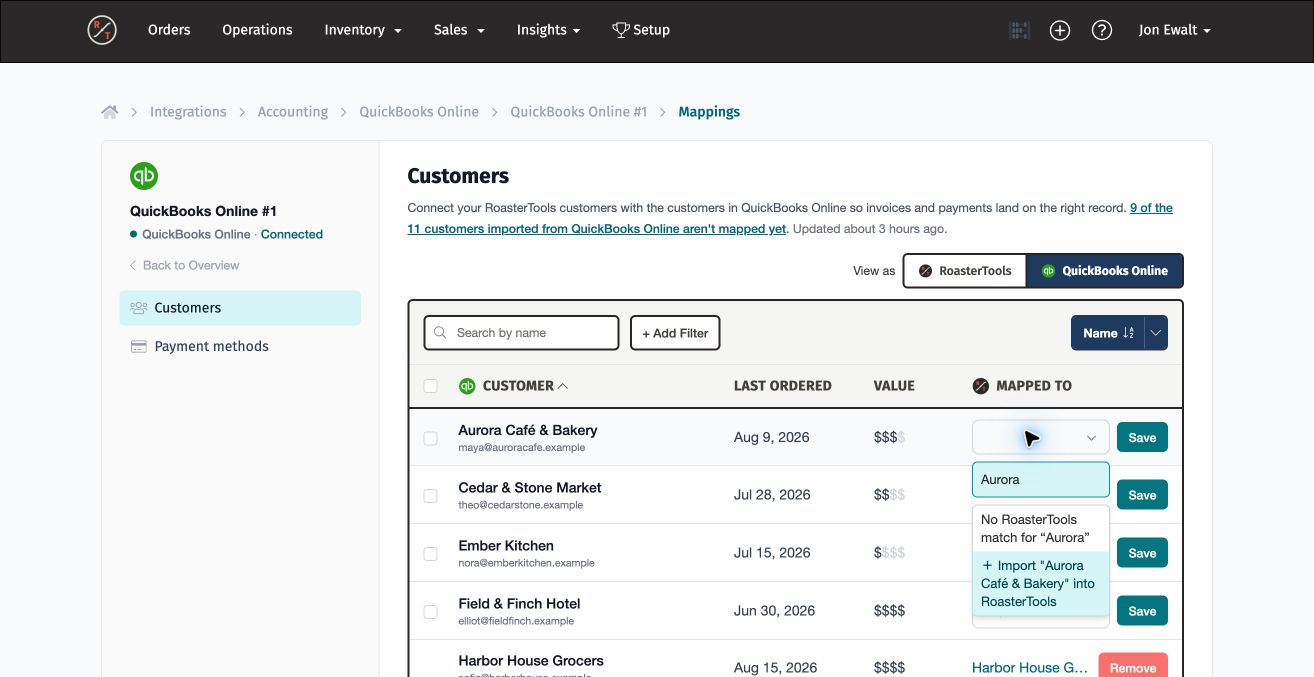
When you import, RoasterTools creates a wholesale customer and maps it to the accounting customer. Available billing and shipping addresses are copied. If the accounting record contains valid email addresses, RoasterTools creates or reuses those contacts and links them to the customer.
3. Import a group of customers
Start with a smaller group of customers that your team is likely to need. You can return and import more customers later.
Use Add Filter to narrow the accounting-platform list:
- Status: Choose Unmapped to hide customers that are already connected to RoasterTools.
- Last ordered: Choose one or more ranges, such as Last 30 days or 31 to 90 days.
- Value: Use the relative customer value when it helps identify the customers your team needs first.
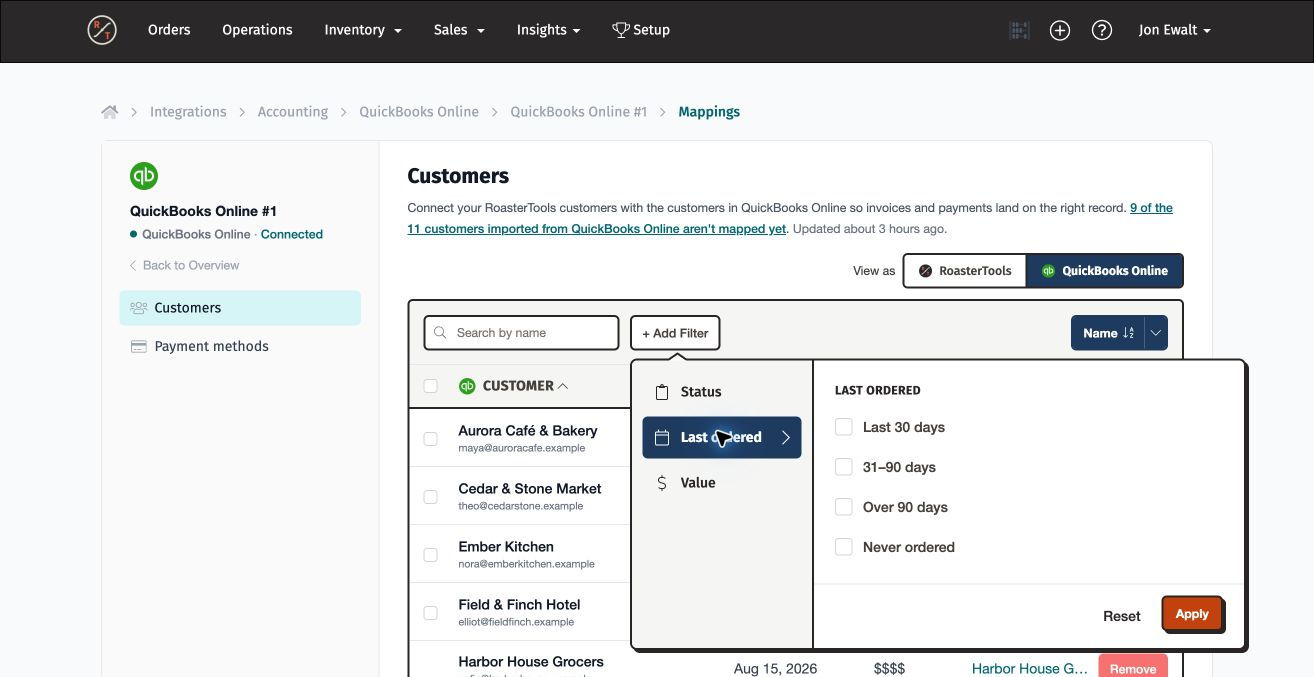
Start with a manageable group. A smaller first import is easier to review. Import customers early when you need their data for customer-specific pricing, exclusive products, or delivery routes. If another customer returns later, import that customer then.
- Review the filtered list.
- Select the customers you want to import. Use the checkbox in the table header to select all unmapped customers currently shown.
- Select Import into RoasterTools.
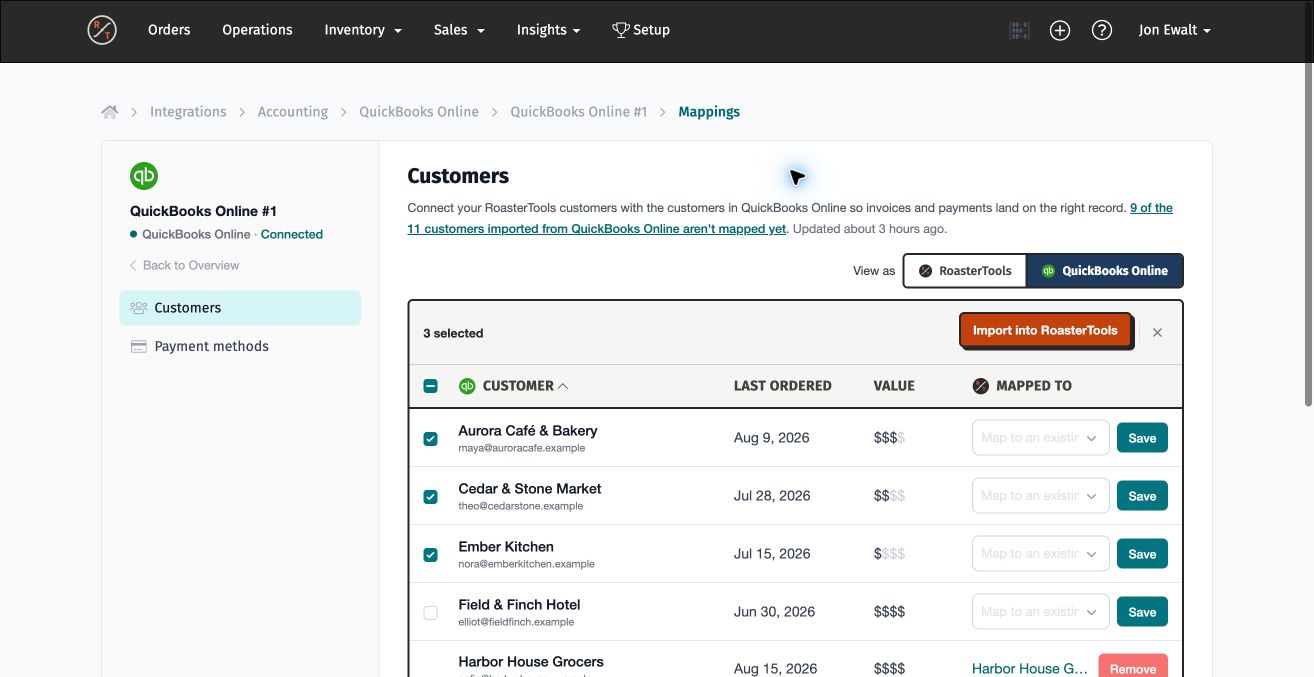
The import runs in the background. Each successful row updates with its RoasterTools customer, and a notification reports how many customers were imported or skipped. Review any skipped customers one at a time before trying again.
4. Review customer data
Accounting customer data may have been entered for bookkeeping rather than ordering, delivery, or tax calculation. The fields that transfer depend on the source data, and not every field transfers perfectly. Review the imported records before relying on them in RoasterTools.
For an individual customer, open Sales → Customers and edit the customer. For a larger group, download the wholesale customer CSV file from your username menu under Settings → Import & Export → Customers.
At this stage, focus on these key fields. Other customer fields can be updated later in the setup process.
- Company Name;
- Shipping Street 1;
- Shipping City;
- Shipping State;
- Shipping Zip;
- Shipping Country;
- Billing Street 1;
- Billing City;
- Billing State;
- Billing Zip; and
- Billing Country.
| Field | What to review | Common issues |
|---|---|---|
| Company Name | Confirm that the business name is correct and matches how your team refers to the customer. | The name may include extra characters or formatting from QuickBooks. |
| Billing Address | Review the street address, city, state or region, postal code, and country. Each component should be present and accurate. |
|
| Shipping Address | Confirm that this is the actual delivery location. It may differ from the billing address. The shipping address affects tax and is exported to ShipStation when that integration is used. |
|
5. Review contact data
A contact is a person assigned to one or more customers. One customer can have several contacts, and one contact can be assigned to several customers.
Open Sales → Contacts to review an individual contact. For a larger group, download the contact CSV file from your username menu under Settings → Import & Export → Contacts.
Review these fields:
- Email Address: Required. The email address identifies the contact when they sign in to the customer Portal, so confirm that it is present and belongs to the intended person.
- First and Last Name: Optional. Confirm that any names provided are correct.
- Customer: Confirm that the contact is assigned to the correct customer or customers. In the contact CSV file, use Customer 1 for the first customer, Customer 2 for the second customer, and later customer columns for additional assignments.
6. Update customers and contacts with CSV files
Update customer data
- Open your username menu, then Settings → Import & Export → Customers.
- Download the wholesale customer CSV file.
- Open the file in Excel or Google Sheets and review the key fields above.
- Make the needed corrections, then save or download the updated file as a CSV.
- Return to the Customers section of Import & Export and upload the corrected CSV file.
- Review the result email for successful and failed rows. Correct any failed rows and upload them again.
- Download a fresh customer file and confirm that the updates were saved as intended.
Update contact data
- Open your username menu, then Settings → Import & Export → Contacts.
- Download the contact CSV file.
- Open the file in Excel or Google Sheets and review the key fields above.
- Make the needed corrections, then save or download the updated file as a CSV.
- Return to the Contacts section of Import & Export and upload the corrected CSV file.
- Review the result email for successful and failed rows. Correct any failed rows and upload them again.
- Download a fresh contact file and confirm that the updates were saved as intended.
For complete file-format and import rules, see Add customers with the CSV importer.
Before moving on: Import only the active customers you need now. Review every imported customer and contact, pay special attention to billing and shipping addresses, and confirm that the customer information is accurate enough to appear on invoices. Other customer fields can be completed later during setup.
Return to Map customers, products, and payment methods for the rest of the mapping workflow.