
Commerce: Partner-Shipped Items (Printful and Shopify Collective)
If your Shopify store sells merch fulfilled by Printful or products shipped through Shopify Collective, RoasterTools recognizes those items automatically and keeps them out of your roasting, inventory, and packing work.
Overview:
What happens when a partner-shipped item imports
How partner-shipped items look on packing slips
Platform note: Partner recognition applies to Printful and Shopify Collective items on direct Shopify connections. Items from other fulfillment apps import as regular items your team fulfills.
What happens when a partner-shipped item imports
- Left out of roasting, inventory, and Fulfill: Partner-shipped items don't create Roast Tasks, don't deduct RoasterTools inventory, and don't wait in Operations > Fulfill.
- Partner-only orders close on their own: If every item on an order ships from a partner, RoasterTools marks the order fulfilled and Shipped automatically.
- Totals and invoices stay complete: Partner-shipped items stay on the order and invoice at full price, so your sales totals and accounting stay accurate.
Note: RoasterTools recognizes partner items when the order imports. Orders imported before this was turned on for your account keep their partner items as regular items.
How partner-shipped items look on packing slips
When an order has both your coffee and a partner-shipped item, the coffee appears in your normal pack list. The partner item prints in a separate Ships separately section at the bottom of the packing slip, so your packing team knows someone else is shipping it.
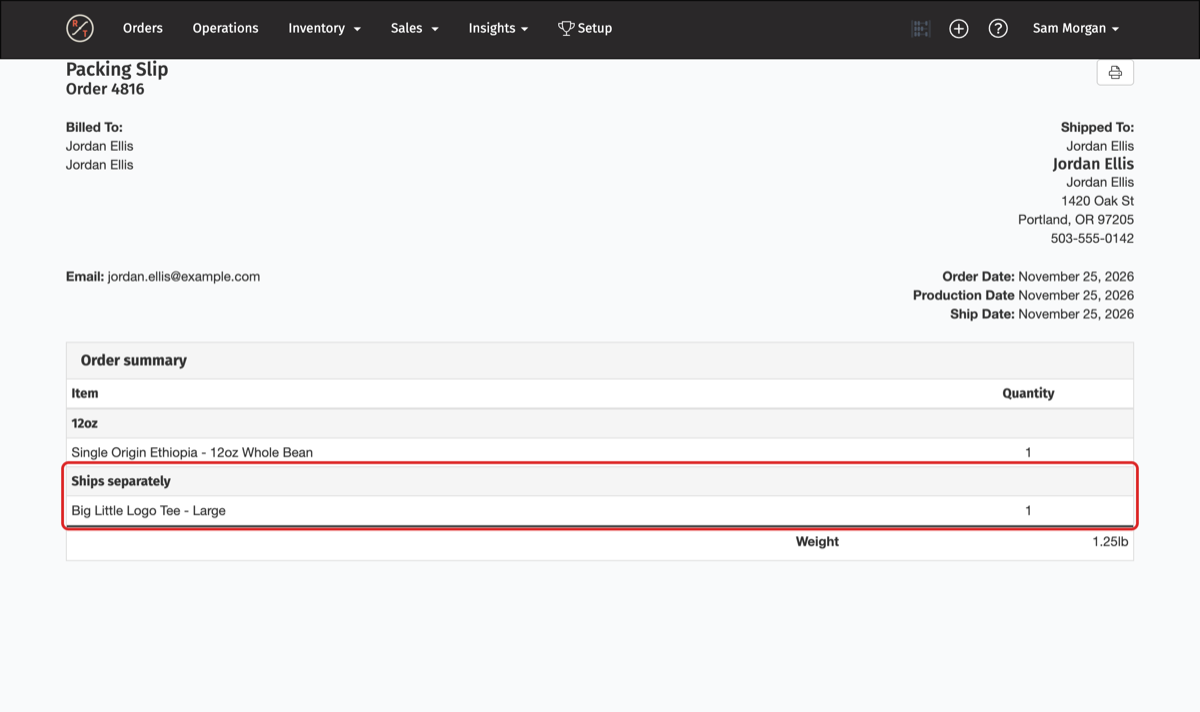
If you mapped the partner item to a product marked Sold, but not packed or shipped, it's left off the packing slip completely.
Product mapping and other partners
- Map each partner item once: Map each Printful or Shopify Collective store variant to a RoasterTools product, just like any other store item. After that, RoasterTools handles it automatically on every order.
- How RoasterTools spots partner items: Shopify lists Printful or Shopify Collective as the item's fulfillment service. Items from any other fulfillment service import as regular items.
- Using another dropship partner? Map those items to an Other product with Sold, but not packed or shipped turned on to keep them out of fulfillment and inventory. Keep in mind that setting is one-way and leaves those items off packing slips completely rather than listing them under Ships separately.
- Items nobody ships, like digital gift cards, tours, or classes: Turn on Sold, but not packed or shipped on that product instead.
FAQ
Q: Why is a Printful item still on my Fulfill list?
A: The order was imported before partner recognition was turned on for your account, or the item comes from a fulfillment service other than Printful or Shopify Collective. Fulfill it as usual.
Learn More: For non-shipped products, see Products: How to Mark a Product as Sold, but Not Packed or Shipped. To fulfill the rest of the order, see How to Fulfill Orders in Operations. For mapping setup, see Commerce Connections: Direct Ecommerce Integrations.